
Hubdoc – data capture software
What is Hubdoc, and how does it work?
Hubdoc is a cloud-based document capture and data extraction tool. It acts as a central inbox for all your supplier invoices, receipts, bank statements, and bills. Instead of manually keying data into your accounting software, Hubdoc reads the document for you and enters it.
Here’s the workflow from paper (or PDF) to Xero in four steps:
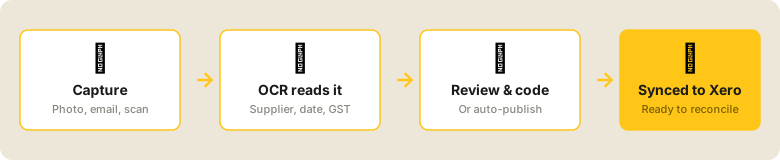
The technology behind step two is OCR (Optical Character Recognition) — software that “reads” a scanned or photographed document and converts it into structured data. Hubdoc uses OCR combined with machine learning to extract key fields like supplier name, invoice date, total, and GST amount. For regular suppliers it learns your coding preferences and can auto-publish without any human input.
You can get documents into Hubdoc via the mobile app (snap a photo), email forwarding (give suppliers a unique Hubdoc email address), desktop upload, or auto-fetch for connected accounts like utilities and phone providers.
What size business suits Hubdoc — and when might you outgrow it?
Hubdoc is designed for small to medium businesses and is particularly well suited to those on Xero — because it’s included free with Xero’s Starter, Standard, and Premium plans. You don’t outgrow Hubdoc based on volume alone (there’s no document cap), but businesses with very high complexity may eventually look elsewhere:
Consider alternatives if you process hundreds of invoices monthly with complex multi-currency transactions, CIS requirements, or need extremely high OCR accuracy. At that scale, Dext may offer better data extraction precision.t gap can stretch to 90, 120 days or more. The longer it is, the more cash your business is effectively lending to others in the supply chain at any given moment.
Start using Hubdoc if you’re processing 20 or more invoices per month manually. At that point the time saving becomes immediately noticeable.
How does Hubdoc save time? A real example
For a business processing around 110 supplier invoices per month, manual processing at an average retail wage (with 28% on-costs for super and entitlements) costs approximately $240/month. With Hubdoc, that same volume costs around $65/month in staff time — a saving of roughly $175 per month, every month.
Is Hubdoc easy to use?
Generally, yes — especially if you’re already using Xero. The learning curve is low, and most staff pick up the basics within a session or two. Here’s what real users say:
Common complaints tend to be about OCR accuracy on complex invoices (multi-currency), occasional login timeouts, and a perception that investment in the product has slowed since the Xero acquisition.
The honest verdict: for standard Australian supplier invoices in a single currency, Hubdoc does the job well. It’s not perfect, but the time saving is real.
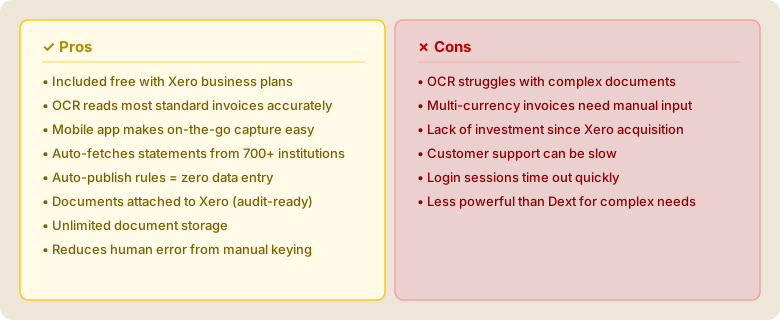
Pros and cons of Hubdoc
How successful businesses use Hubdoc
The businesses getting the most out of Hubdoc aren’t just using it as a scanner — they’re using it to restructure who does what. A common pattern: the business owner or a junior staff member handles document capture in real time (snap the photo the moment the delivery arrives), while the bookkeeper handles coding and reconciliation remotely. No paper shuffling. No end-of-month invoice chase.
Bookkeeping firms use Hubdoc to manage multiple clients efficiently — auto-publish rules for each client’s regular suppliers means bills are coded and in Xero before the bookkeeper even opens the file.
For retail businesses receiving daily stock deliveries — where invoices arrive constantly in paper, PDF, and email formats — Hubdoc is particularly powerful. Staff can capture at the point of receipt, which means your books reflect your stock costs almost in real time.
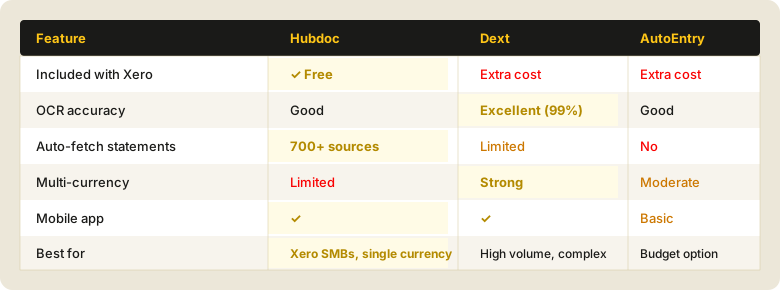
How does Hubdoc compare to alternatives?
Nicole at ROI has experience is varying methods of tracking cashflow. Feel free to book a free chat to discuss options.
Will Hubdoc store all my documents, and for how long?
Yes. Hubdoc stores your documents in the cloud indefinitely while your account is active, and retains data for 7 years per its privacy policy — which aligns with the ATO’s requirement to keep most business records for 5 years. Every document you upload is attached to the corresponding Xero transaction, so your audit trail is built automatically.
Is Hubdoc secure?

Hubdoc is a Xero product and benefits from Xero’s enterprise-grade security infrastructure. It is included in Xero’s SOC 2 Type II audit scope and Xero holds ISO/IEC 27001:2013 certification, validated annually by an independent external auditor. In practical terms, Hubdoc is considerably more secure than emailing invoices around or storing paper files in a cabinet.
Is Hubdoc easy to set up?
Yes — if you’re already on Xero, it takes about 10 minutes to connect. Most of the setup complexity is in configuring auto-publish rules for your regular suppliers, which is a one-time investment that pays dividends immediately.
Nicole at ROI has experience is varying methods of tracking cashflow. Feel free to book a free chat to discuss options.
The bottom line
Hubdoc isn’t a perfect product, but for small Australian businesses on Xero, it costs nothing extra and delivers real time savings from day one. If you’re spending more than an hour a month keying in invoices, Hubdoc is worth setting up this week.
Want help setting up Hubdoc for your business?
ROI Bookkeeping works with product businesses, importers, startups and growing SMEs across Australia.
We can connect Hubdoc to your Xero, configure auto-publish rules, and train your team — usually in a single session.Get in touch today… ➡️Book a chat, call 0432 689 167 or email [email protected]
www.roibookkeeping.com.au